

Two Nasty WordPress Vulnerabilities You Need To Patch Right Now
If you run a WordPress website (and let’s face it, with roughly 40% of the internet built on it, there’s a good chance you do) you may have seen some scary headlines flying around recently about a couple of newly discovered security vulnerabilities. We wanted to break down what’s actually going on in plain English, without all the technical jargon, so you understand why this one is worth paying attention to.
What’s happened?
On 17th July 2026 the WordPress core team quietly shipped out a security update to fix two vulnerabilities that, when combined, allow a complete stranger with no login details whatsoever to break into your website’s database and ultimately take full control of your server. No plugins required, no dodgy password needed, nothing. Just an out of the box WordPress installation running an affected version.
These have been given the catchy nickname “wp2shell” by the researchers who found them, and they’re tracked officially as CVE-2026-60137 and CVE-2026-63030.
So how bad is it really?
On its own, the first flaw (CVE-2026-60137) is a database tampering issue that would normally require someone to be logged in already, so not the end of the world. But the second flaw (CVE-2026-63030) is what makes this one nasty, as it allows a random visitor to sneak past that login requirement entirely. Chain the two together and you’ve got a recipe for a total site takeover from someone who has never even seen your login page.
Public proof of concept code is already floating around and there have been early reports of this being exploited in the wild, so this isn’t one of those “patch it whenever you get round to it” situations.
Which versions are affected?
- WordPress 6.8.x and later are affected by the database tampering flaw (CVE-2026-60137)
- WordPress 6.9.x and later are affected by both flaws, which is the combination that leads to full site takeover
- Anything before WordPress 6.8 is not affected by either issue
Which versions are safe?
WordPress pushed out the following patched versions:
- 6.8.6 (fixes the database tampering issue only, as the second flaw doesn’t exist on the 6.8 branch)
- 6.9.5 (fixes both issues)
- 7.0.2 (fixes both issues)
- 7.1 Beta 2 (fixes both issues, for anyone brave enough to be running the beta)
If you’re on any of the above, or newer, you’re covered.
How do I check what version I’m running?
Easiest way is to log into your WordPress admin area and take a look at the bottom right hand corner of the Dashboard page, which will show your current version number. Alternatively head to Updates in the left hand menu and WordPress will tell you if there’s a newer version available, or you can check via the WordPress Manager by Softaculous icon in cPanel which will list the version for every WordPress installation on your account in one place, handy if you’re managing more than one site.
Because this one was so serious, WordPress actually took the fairly unusual step of force pushing the update out automatically to every site that had auto-updates switched on, so if that’s you, there’s a good chance you’re already patched without having lifted a finger. If you’ve disabled auto-updates or manage your sites independently though, you’ll need to go and check manually.
Let WordPress update itself in future
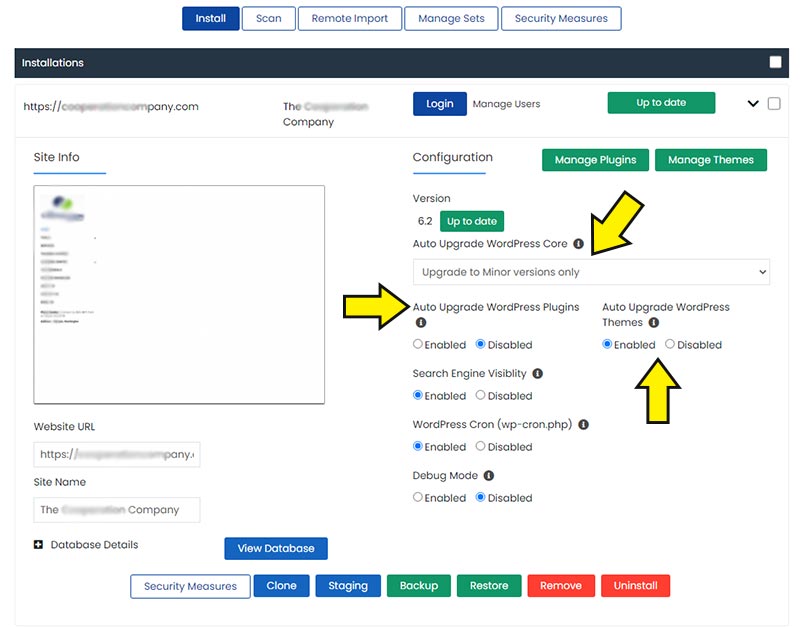
This whole saga is a great excuse to mention that you don’t actually need to be manually clicking the update button every time WordPress releases a new version. We wrote a guide a while back on how to automatically update WordPress from cPanel using the WordPress Manager by Softaculous tool, which takes all of two minutes to set up and means you’ll never be caught out by something like this again.
What if you’re on a really old, unpatched version?
If you’ve read this and had a small panic because you’ve got an old site sitting on something ancient like WordPress 6.1 or earlier, the good news is you’re not actually affected by either of these particular vulnerabilities, as they only apply from version 6.8 onwards. The bad news is that running a hopelessly out of date WordPress installation is still a terrible idea, as you’ll be missing out on years worth of other security fixes.
We recently had to do exactly this with one of our own older sites, jumping it from a very tired 6.1.10 all the way up to the latest release, so here’s how we’d recommend you approach it:
- Take a backup, and then take another one for luck. Before you touch anything, back up your files and your database. If the worst happens partway through an update on a site that old, you want to be able to roll straight back without breaking a sweat. We can’t stress this enough, so we’ll say it one more time for the people at the back: backup, backup, backup!
- Create a staging copy of your site. If your hosting account has Softaculous available, the WordPress Manager includes a built in staging feature that lets you clone your live site to a separate testing environment in a couple of clicks. This means you can run the update on the clone first and see exactly what breaks, without your actual visitors ever knowing anything happened.
- Update the staging copy and put it through its paces. Click through the important pages, test any forms, check the checkout process if you sell anything, and log into wp-admin to make sure everything still behaves itself. Old themes and plugins are usually where the trouble hides, not WordPress core itself.
- Once you’re happy, push staging to live. Softaculous will handle this for you, but it’s still worth taking a fresh backup of the live site immediately beforehand, just in case anything is different between the two environments.
- Give the live site a final once over. Homepage, a product or blog post, any forms, and the admin login, just to be sure nothing has slipped through the net.
We’re pleased to say our own test went smoothly with nothing broken along the way, but that won’t always be the case on every site, particularly the older or more heavily customised ones, so don’t skip the staging step or the backups.
Speaking of backups…
If the thought of manually backing up your site before every update fills you with dread, or you’re not entirely confident your current backup setup would actually save you in a real emergency, take a look at our Managed WordPress Backups service. It gives you fully automated, offsite backups stored well away from your hosting server, with a genuine 1-click restore if you ever need to turn back the clock. We covered why this matters so much in more detail in an older post, here’s why backups are important, which is well worth a read if you’ve never given it much thought before.
The bottom line
If you’re on WordPress 6.8 or later, go and check your version right now and update if you haven’t already. If you’re on something older, you’ve dodged this particular bullet, but please don’t take that as a sign everything is fine, it almost certainly isn’t. Get yourself updated, and get yourself backed up properly while you’re at it.
As always, if you’re one of our hosting customers and you’re not sure what version you’re running or need a hand with any of the above, our support team are on hand 24/7 to help.
